If you have used an USB drive to write iso images to before installing Debian or recent versions of Ubuntu, here are the steps to reclaim it after installation is over.
- Open a terminal and list the available device names using the following command:
lsblkwhich should show you an output like the one below:
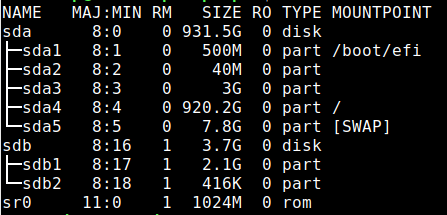
- Identify the device name of your USB drive. Extreme caution should be taken while at it because wrong device names can potentially wipe your entire hard disk. In this case, the USB drive that we want to format is sdb.
- Writing the iso image to the USB drive has made it a read-only device. To change it back, the partition table needs to broken. Issue the below command after replacing sdb with the device name identified in the previous step:
sudo dd if=/dev/zero of=/dev/sdb bs=1M && syncThis step might take some time to complete depending upon the size of the USB drive. So be patient. When it is over, you should see an output like the below: