Format USB drive after installing Debian from it

If you have used an USB drive to write iso images to before installing Debian or recent versions of Ubuntu, here are the steps to reclaim it after installation is over.

  1. Open a terminal and list the available device names using the following command:
    lsblk

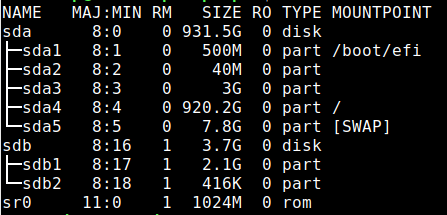
    which should show you an output like the one below:

  2. Identify the device name of your USB drive. Extreme caution should be taken while at it because wrong device names can potentially wipe your entire hard disk. In this case, the USB drive that we want to format is sdb.
  3. Writing the iso image to the USB drive has made it a read-only device. To change it back, the partition table needs to broken. Issue the below command after replacing sdb with the device name identified in the previous step:
    sudo dd if=/dev/zero of=/dev/sdb bs=1M && sync

    This step might take some time to complete depending upon the size of the USB drive. So be patient. When it is over, you should see an output like the below:

[Read more]

Creating an unpriviledged lxc container on Debian Stretch

After a few earlier failed attempts, today I was successfully able to create an unprivileged LXC container on Debian Stretch for the first time. I had experience of using LXC's more user friendly cousin LXD before I moved to Debian but unfortunately LXD is not available on Debian yet. While LXC is more low level compared to LXD, if you just need a basic container, it's still pretty solid. The Debian wiki on LXC container is fairly straight forward and easy to follow, but still for someone who is a novice to both Debian and LXC, it is very easy to get lost. So I am writing this post so that it can be a good place to start if you need a very basic setup.

[Read more]

Assigning volume up/down shortcut keys for secondary speaker in Linux

I have a wireless Bluetooth speaker that I use with my laptop running Debian 9 with Xfce. My laptop also has a primary speaker. So when I connect my Bluetooth speaker to my laptop, my laptop is actually connected to both the primary and secondary speaker at the same time. The laptop volume up/down keys will still be mapped to the primary speaker and if I wish to control the volume of the secondary speaker, I needed to open the Volume Control window from the Panel volume plugin, which was a pain if you had to do it every time.

[Read more]

Installing the latest Libreoffice on Debian stable

One of the few software that I like to keep always updated to the latest version on my system is Libreoffice, because of the compatibility improvements with the other office suite each new version brings. And while Debian Stable provides a solid and stable base system, the libreoffice package becomes outdated with time. A lot of the guides on updating Libreoffice in Debian on the Internet speak about installing the latest binaries from the Libreoffice website. But the main shortcoming with this approach is that updating to the next version is again a manual task.

[Read more]

Install Debian on an unclean target

Recently I had to downgrade my main laptop from Debian testing to Debian stable (Stretch at the time of writing). Since I did not have a separate home partition, re-installation meant formatting the entire partition that would erase all my personal data and settings. But this time I did not want go over the pain of configuring everything from scratch, so I went ahead without formatting my root partition. After a few times of failures and analyzing the installation logs, I learnt the trick.

[Read more]